What's New
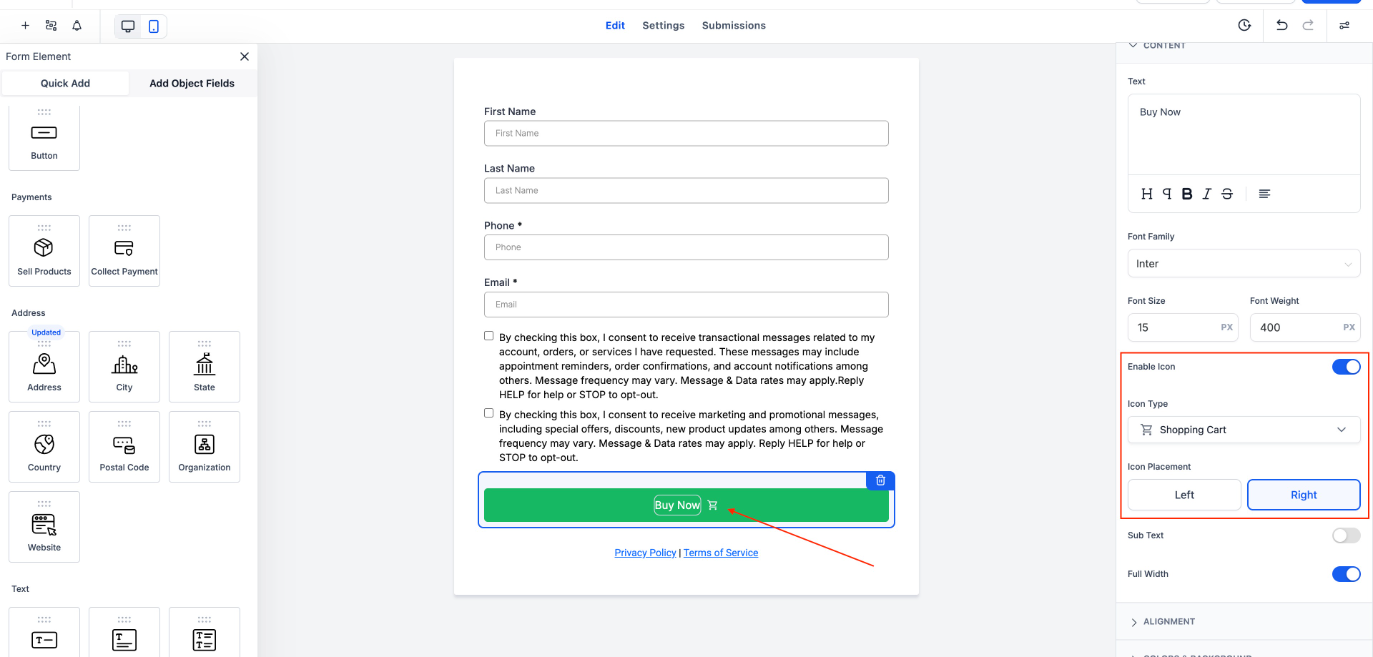
You can now add icons to form buttons! The latest update brings a fresh, intuitive way to enhance your buttons with a wide selection of Material Symbols - all searchable and easy to use.
Key Highlights
- Icon Picker Sidebar:Add icons to buttons with a simple toggle and search interface.
- Flexible Placement:Choose to display icons on the left or right of the button label.
- Live Preview:Instantly see your selected icon rendered in the form preview.
How It Works
- Add a Button Element to your forms and toggle the “Show Icon” option to enable icons on a button.
- Use the search-friendly icon picker to find the perfect symbol.
- Choose where the icon appears - left or right of the label.
- Watch changes reflect immediately in the preview pane for a seamless design experience.
This enhancement brings added visual polish and interaction cues to your forms, making them not just functional, but delightful to use. ?
Was this article helpful?
That’s Great!
Thank you for your feedback
Sorry! We couldn't be helpful
Thank you for your feedback
Feedback sent
We appreciate your effort and will try to fix the article